Hello World - Project Hybrid

Last post I shared a little bit about about this at-home project and more about myself. I'm a cybersecurity professional by trade and eager to ship my first iOS app. At the time of my first blog post I didn't have a name but I think I've landed on 'Project Hybrid'. The idea remains, a single app that knows everything I'm doing - strength, endurance, nutrition, and recovery. V1 of this project is going to be the strength tracker.
The Tech Stack
- Native iOS : Swift and Swift UI. I chose this route over React Native because of the Apple HealthKit being dramatically better.
- SwiftData for local storage. No backend for my V1 or POC as I'm the only user. My data lives on my phone, simple.
- Xcode for building and running the app.
- Cursor as my editor, with Claude doing the heavy lifting on the actual code.
- iPhone for testing on my real device, not just the simulator through Xcode.
The cost so far is a whooping $0. Development is on my personal MacBook Pro. Xcode, Cursor's free tier and a free apple developer account got me to the point where I'm ready to start creating the scaffolding for this app. When the time comes I'll need to look into the Apple Developer subscription for when I want to push builds via TestFlight.
I'm not currently building for Android or building a backend (I'll add one when I have a reason). I'm also not writing every line of code from scratch. As I mentioned above, Cursor + Claude will do the heavy lifting. I'll be product thinking, data modeling, debugging, and most importantly learning to ship an iOS app in 2026.
The Dev Setup
After some time getting my macOS updated it took about an hour to get Xcode (with iOS 26.2 included), Cursor and my free-tier Apple Developer account all set up. I started a new project in Xcode selecting iOS app as my starting point.
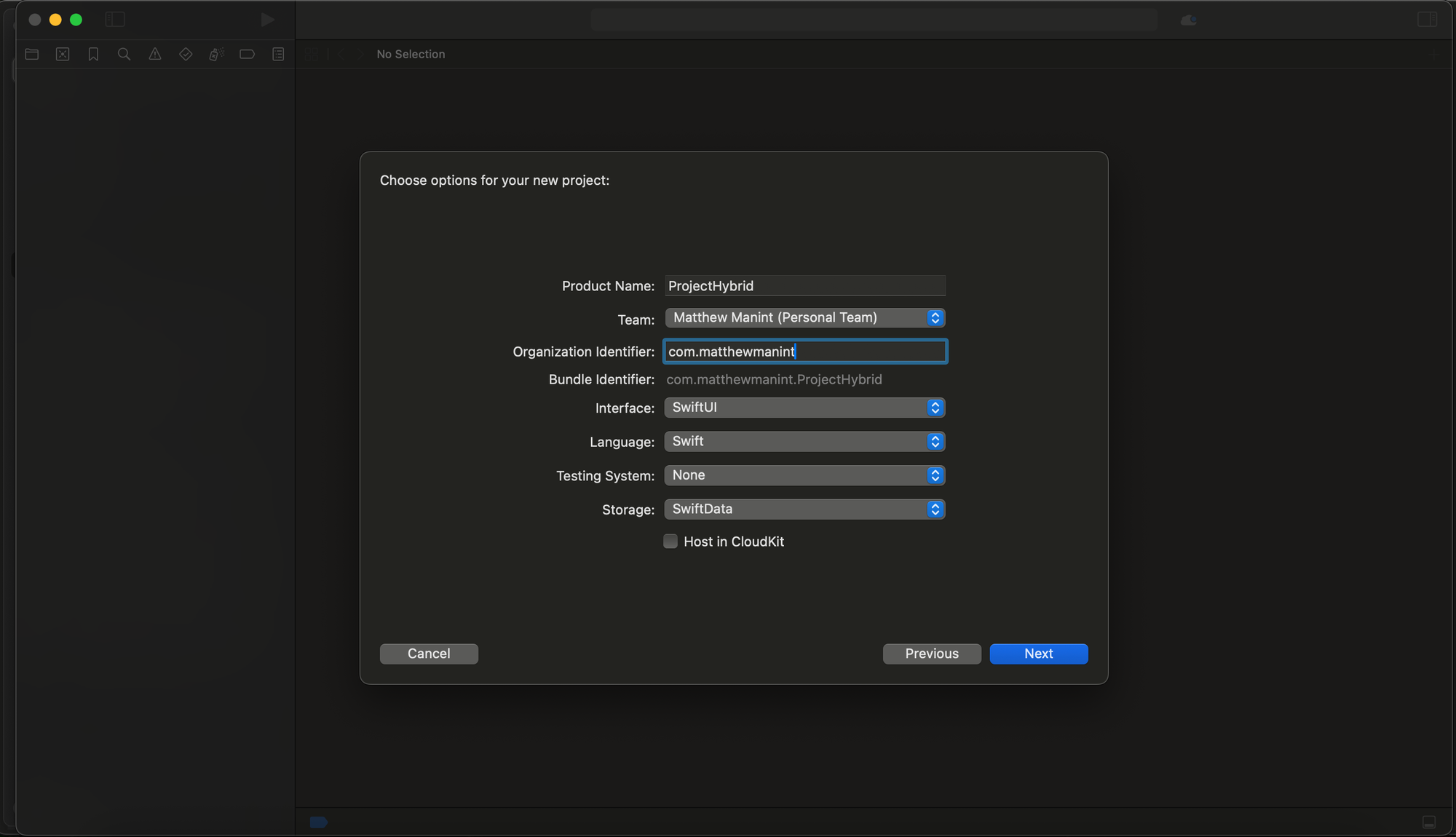
Above is the Project Hybrid Xcode project configuration. I set up the project with SwiftUI as the interface and SwiftData as the storage layer. The product name is ProjectHybrid , tied to my free Apple Developer account, with com.matthewmanint as the organization identifier. A tidbit I learned is that last bit is just reverse DNS naming that Apple uses to ensure the app has a globally unique bundle ID. Neat. I unchecked Host in CloudKit as its a little premature for V1. After configuration, Xcode handled getting the project setup.
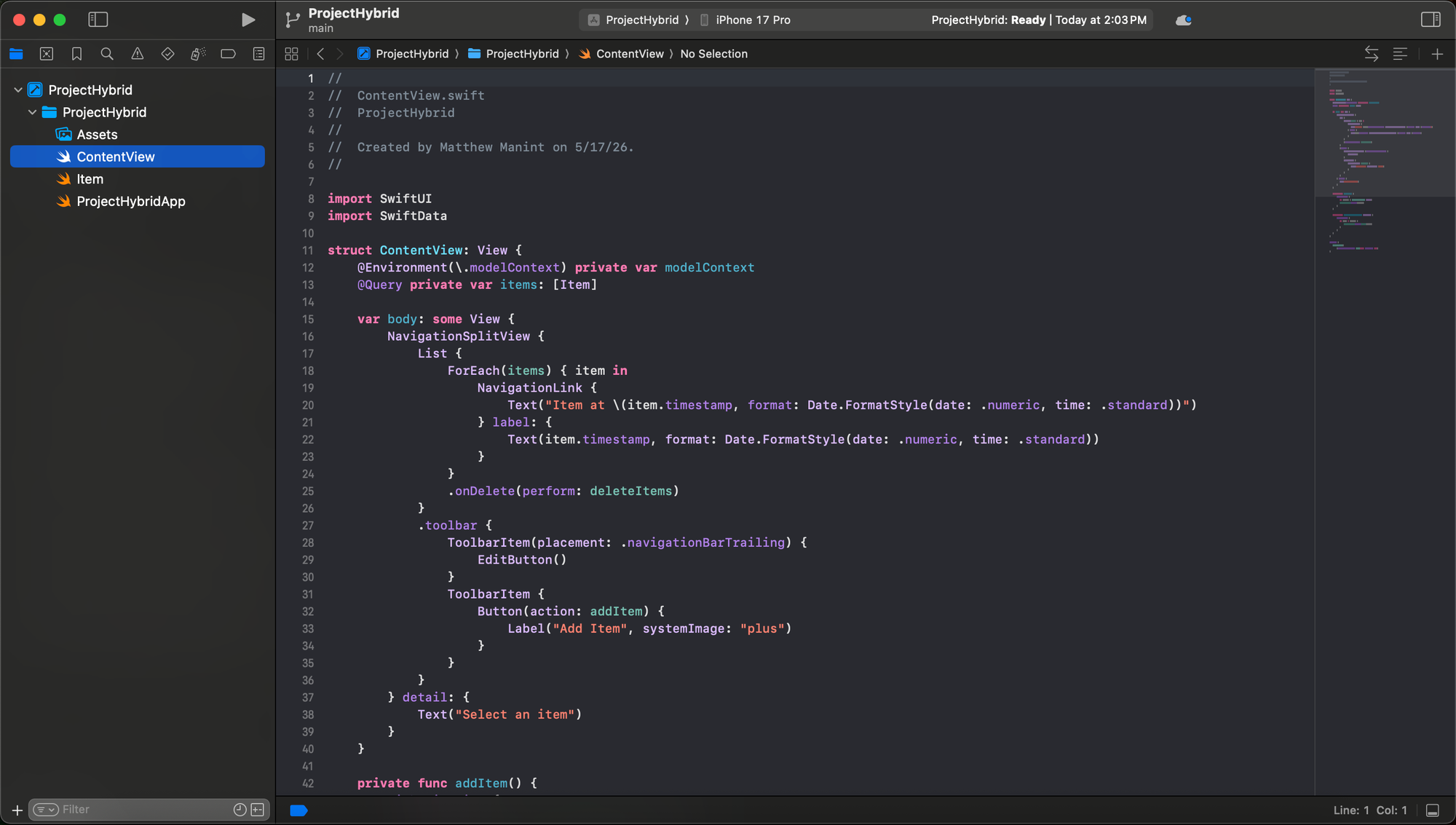
Above is the pre-set skeleton so graciously given by Xcode which is great foundation to build my app off of.
- ProjectHybridApp.swift: This is the entry point of my app, essentially my
main()function. - ContentView.swift: This is the first actual screen. Right now it contains a default demo. This is the file I'll update with the real UI.
- Item.swift: The default SwiftData model which is a simple
Itemwith a timestamp. This is Apple generated so the demo has something to work with. Eventually I'll delete it and replace it relevant models for Project Hybrid.
Now that my foundation is poured, in the next post I'll be creating data models for the project and start building this out.
Let's do it.
-Matt